Showing posts with label m-Learning. Show all posts

Wednesday, May 1, 2013

Some of the Interesting Things I Saw at the MedBitquitous Conference

I recently attended the MedBiquitous Conference at Johns Hopkins. This conference focuses on technology standards in health care education (conference hash tag - #Medbiq2013). There was quite a lot I saw and learned during these two days, but here just a few of the things from the conference that I wanted to throw up on the blog. 


The Center for Disease Control and Prevention (CDC) has a great open online learning site, CDC Learning Connection, also added it to the Free eLearning page. In addition, they have a good guide for elearning designers, E-learning Essentials Guide, which is a good resource for anyone involved in creating elearning, especially anyone new to the field.


CDC has a goal of developing a central data store for public health training in which LMSes can go. 
Note: They are doing some cool work with Experience API... I also learned Tin Can API is also being called ExperienceAPI, but it depends on who you talk to, ADL or Rustici.


I saw a presentation on a mobile health application called EMocha. It was developed by Johns Hopkins Center for Clinical Global Health Education and is used in Africa and also right here in Baltimore.

I was very impressed by a presentation titled "Teaching Clinical Reasoning Using Game Tech," which showed one of their study's applications that used game tech in learning. What impressed me the most was use of video embedded in the interface. This simulator, which included an electronic fetal monitoring (EFM) and a labor and delivery room, allows one to view and hear the learner via video embedded in sim (see pic below). Being able to view and hear the learner's immediate reaction and feedback to the simulation was great as a course evaluation tool and can be a helpful in coaching the learner too. 


If you are involved in health care education or training, the MedBiquitous Conference is a great learning event. Hope to see you there next year!


Wednesday, February 9, 2011

My Big Question Response - Predictions for My 2011 #LCBQ


I recently posted my 2011 predictions, but they are general predictions for e-learning and technology. So, here is my response to the Learning Circuits' Big Question, which asks to be more focused on our challenges, plans and predictions.

First off, over my years in corporate training, I have explored many areas of learning and development. This ranges from classroom training to many facets of e and m-learning. What I am predicting for my own challenges and plans for 2011 is not delving into new technology or mediums of delivering learning, but rather a blending of many approaches and technologies I have in my current learning toolkit. A current example is a large software training effort I am designing that takes advantage of blending technologies and approaches. Believe it or not, this training program will incorporate the following:

  • A web-based training (WBT) course that incorporates QR Codes and social bookmarking in addition to simulations,  instruction and job aids.

  • Blogging that also incorporates use of social media, social bookmarking and screencasts (thanks Screenr and DIIGO).

  • Classroom training – not a traditional classroom format, but a “learning lab” with more advanced explorations of the topic and objectives driven more by the audience than the facilitator or course design. Hopefully also resulting in instruction/tips & tricks shared by the audience and facilitator.

  • m-Learning and informal learning - I am using QR Codes and tweeting to also get content and additional resources out, but more importantly encouraging the audience to do the same. I will be really excited when I see the audience start setting their own objectives and teaching each other.


Yes, the above may look like a mishmash of technology and approaches, but it does support the learning design and the audience's learning needs. There is a method to the madness and I am not using the technology without rhyme or reason.

Another exciting plan, and somewhat of a challenge, for 2011 is delivering more learning to my audience that is off the LMS. As you can see, much of the fore-mentioned is outside of the LMS. However, here are some more ways I am delivering learning without the need to log-in to the LMS.

  • With few exceptions, my audience in corporate training has been internal. This has recently changed and will change much more in 2011. I have already begun providing training for our external customers, including developing educational games and software demos... not on the LMS.

  • Tweeting and responding to tweets... not on the LMS.

  • Posting job aids on Intranet pages... not on the LMS.

  • Screencasts - These are great for brief, easy to develop, software sims and I have started adding them to our Intranet pages... not the LMS.

  • Guess what, people still learn even when... not on the LMS.


Although these are my own challenges, plans and predictions for 2011, I believe we will see others embarking on similar challenges. So my overall prediction is much more blending of technology applications and more delivery OFF the LMS.


What are your challenges, plans and predictions? Be sure to share them at the Learning Circuits' Big Question and tweet them too at #LCBQ.


Sunday, January 23, 2011

Dabbling in QR Codes

Diigo QR CodeTag

I have been hearing so much talk, and seeing use, of QR Codes lately. Maybe I am noticing it more because I started dabbling in them myself or maybe they are on the rise. Either way, I want to share a few things about QR Codes. First off if you do not know what they are, here is a quick definition:
A QR Code is a specific matrix bar code (or two-dimensional code), readable by dedicated QR bar code readers and camera phones. The code consists of black modules arranged in a square pattern on a white background. The information encoded can be text, URL or other data.
Source: Wikipedia

To simplify, with a QR Code reader on your smart phone you can use the phone's camera to scan the QR Code (like the crazy black and white thing at the top of this page) and it will take you to a web page, display text, phone number and/or prepare a text message to be sent.

The great thing is they are extremely easy to create and use in your online learning or in the traditional classroom. Using a QR Code generator (e.g., Kaywa, Snap.vu, etc.), you can create and copy the code to a web page, PowerPoint slide, add it to a manual, print it, etc. Now when it is seen in your classroom or online course participants can scan the QR Code and visit the site, obtain the text info or data.

Here is a demo showing how easy it is to generate a QR Code.

http://screenr.com/Content/assets/screenr_1116090935.swf

Here are a few ways I am starting to use QR Codes:

  • Adding my contact information to my classroom powerpoints and manuals. I even posted one with my contact info outside my office.

  • Include QR Codes in manuals and job aids that take the user to relevant URLs.

  • Adding codes in e-learning courses. For example. the video below shows one in a course that directs the user to social bookmarks containing additional resources and tutorials.


See an example of a QR Code in a WBT course.

Here are also my QR Codes bookmarks where you will find more resources on this subject including links to QR Code generators. Of course the QR Code for this link is below too.

Diigo QR CodeTag


Monday, January 17, 2011

My 2011 Predictions

Well it's that time again. Here are my e-learning predictions for the coming year.

  • You know I have to include a Flash prediction. So, here you are...  I predict a Flash player will finally be included on the iPad and iPhone this year. This will be mostly due to the fact that so many more phones, and tablets, will be released with Flash, pressuring Apple to do the same.

  • Say goodbye to the "e-" and the "m-" and say hello to just "learning" in 2011. I think we will be less concerned about the medium and will call it "learning" regardless of whether it is in the classroom, computer, phone or wherever else you are finding it.

  • The coming flood of tablets in 2011 will move m-learning much further along. However, I think people will be distinguishing less and less between the terms e-learning, m-learning, and just learning. After all, where does m-learning stop and e-learning begin? See prior prediction.

  • With the economy improving, we will see reinvestment in classroom training and classroom trainers. I believe too many organizations have hastily delved into online training, resulting in developing courses that are better off in in the classroom than online. Plus with so many rushing into e-learning without investing the time in understanding the design end has resulted in ineffective "rapid e-learning." I think we will see these people who had good intentions are going to move away from e-learning. For those that may be in that boat, don't give up on e-learning, but please read "Hey You Rapid e-Learning Peeps, Slooow Down and Take a Little Drive on the ISD Side of Town."

  • QR Codes will become more prevalent in the U.S. In fact, I just started using them myself by including them in a new e-learning course. I also plan to start adding them to job aids, manuals, presentations and anywhere else when appropriate.


qrcode


Want to see what I predicted last year?

Monday, September 20, 2010

Nevermind the iPad, Here Comes the Galaxy Tab... It has Flash

Even I will admit the iPad is an exciting device, but because it is  missing Adobe Flash it is not something in which I am willing to spend the money. As you can see in the video below, we will be able get a tablet with Flash, which is enticing to me. Who knows, maybe with enough tablets coming to market with Flash on them Apple will rethink adding Flash to the iPad.

http://images.tv.adobe.com/swf/player.swf

Monday, July 12, 2010

Google App Inventor - Make Apps/m-Learning

Google is releasing App Inventor for Android. You can find it listed at Google Labs and can learn more about it at http://appinventor.googlelabs.com/about.

There is obvious potential for m-learning, including quizzes, educational games, mini-courses, informal learning.. really the sky is the limit. If development is as easy as they claim, then we can focus even more on design and are not as limited by the complexity of app development. The App Inventor uses Open Blocks, which is distributed by MIT's Scheller Teacher Education Program. Please note, the apps are for Androids and I will assume they will not be supported across all smart phones, which is a hindrance in developing m-learning.

According to the site, they will be granting access to interested users in the coming weeks. I have put in my request and will let everyone know if/when it is granted. All that is needed is a Google account to sign up.

Here is a video Google provides showing the development of a very simple app.


Google also provides descriptions of examples that have been developed.

Wednesday, March 10, 2010

Innovative Uses of Mobile Devices in Health Sciences

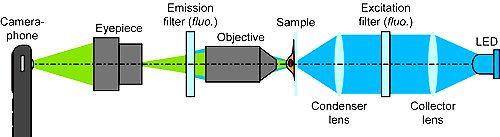
[caption id="" align="aligncenter" width="300" caption="CellScope"]Cellscope diagram from UC, Berkely[/caption]

Here are a couple of great and innovative uses of mobile devices I stumbled upon on SmartPlanet,com. Not only do these innovations increase the ability to provide better healthcare in the developing world, but also has great potential in mobile learning (m-learning).

http://image.com.com/gamespot/images/cne_flash/production/media_player/proteus/one/proteus2.swf

You can read more about the CellScope at UC Berkeley News.

http://image.com.com/gamespot/images/cne_flash/production/media_player/proteus/one/proteus2.swf

Visit Tapan Parikh's page to learn about the social media and mobile technology projects in which he is involved.

Wednesday, February 24, 2010

Preview a Tablet, but This One has Flash

As we all know, that tablet everyone has been talking about recently does not have Flash. Oh well, I am over it. However, Dell will be releasing a multi-touch tablet of their own, the Mini 5, and it WILL have Flash. Take a look of the preview below from Adobe TV.

http://images.tv.adobe.com/swf/player.swf

Yes, I know what you are thinking. A 5 inch screen and they are calling it a tablet? It may be a stretch, but Dell is talking about scaling it up and offering larger versions. Beyond a 5 inch screen and I will let them slide on the semantics.

Friday, January 29, 2010

History of Adobe Flash

I am a big user of Flash and find it to be one of the most effective tools in my e-learning toolbox. Earlier this week I was very disappointed to learn Flash will not be included in the Apple iPad. I was hoping the iPad would be a great new medium for m-learning delivery, but without Flash it will be very limited in its ability to deliver the level of interactivity mobile learning deserves.

Now that I got that out of my system, here are a few resources on the history of Flash.

http://www.npr.org/v2/?i=122921703&m=122926700&t=audio


Of course there is "The Rather Amazing and Slightly Distorted History of Flash" created by Nectarine.


Tuesday, January 5, 2010

Preview of Flash Player on the Google Nexus One

Each time Flash appears on another mobile phone I get ever more hopeful about Flash becoming THE delivery platform for m-learning.

So, will Flash be on the new Google phone that everyone is buzzing about? It is not currently, but Adobe will be making it available for download sometime in future and here is a preview.

http://tv.adobe.com/assets//swf/player.swf

We are moving a little closer to a world were Flash is on every smart phone... iPhone, where are you?

Sunday, December 13, 2009

m-Learning e-Book "New Technologies, New Pedagogies: Mobile Learning in Higher Education"

SmartphoneA free e-book, New Technologies, New Pedagogies: Mobile Learning in Higher Education, is available for free download through the University of Wollongong's Research Online. This book provides examples of m-learning implementation and concludes with some recommended design principles for m-learning. For anyone involved in m-learning, this is a worthwhile read.

You can also download the e-book (PDF file) directly via this link.

Friday, December 4, 2009

Flash Player 10 on Mobile Devices

Here is a video from Adobe Max 2009 with Adobe's CTO demonstrating Flash Player 10 on numerous mobile devices including Nokia, Palm and Android. Plus, he runs Connect Pro on a mobile phone. I am happy to see more advances with Flash Players on mobile devices. After all, more Flash on mobile devices, more opportunities to use Flash in m-learning.


FYI: Flash Player 10.1 is available as a prerelease for PCs and netbooks at Adobe Labs.

Sunday, November 29, 2009

Hanukkah e-Learning Wish List

Hanukkah HarryMy kids are making their wish list for Hanukkah, which inspired me to make my own. I do not necessarily expect to receive any of these things, but if Hanukkah Harry reads this blog, which he may, their is a chance he will grant at least a few.

  1. Adobe CS4 eLearning Suite - I am still working with CS3.

  2. High end microphone - It will come in very handy for adding audio to courses, plus it will look great on my desk.

  3. OutStart Trainer - I am currently using another DHTML editor in which I am not enthralled at all.

  4. The not yet released, possibly mythological, Apple Tablet - It does not exist yet, but I am willing to take a rain check in case it ever does.

  5. m-Learning development tool that produces courses compatible with ALL mobile platforms.

  6. DevLearn 2010 conference -  It has been quite a while since any budget has allowed me to attend a conference.

  7. Supreme knowledge of ActionScript - To know it to a point that there is nothing I cannot do with Flash (that's on me isn't it?).

  8. Open access to all social media for the workers of the world - I am lucky to have access to such things as LinkedIn and Twitter, but not all do. Some organizations block social media sites from their staff. I wish this to end.


If you have your own wish list, please share it in the comments section or add a link if it is on your blog.  Of course it does not have to be a Hanukkah list, it can be for whatever holiday you celebrate.

Friday, November 20, 2009

LearnTrends 2009 Archive Videos Now Available


If you were not able to attend this past week's LearnTrends Conference, they have recorded the sessions and made them available at the link below.

http://learntrends.ning.com/page/learntrends-2009-november

The sessions were wonderful. Thank you to everyone who put it together. I learned quite a bit during these 3 days and plan to visit the recordings of the few sessions I was unable to attend.

Monday, October 5, 2009

Flash is Coming to Blackberry - Announced at Adobe Max

Adobe Flash Logo

Today Adobe announced they will be releasing Flash Player 10.1, which will extend the use of Flash on mobile devices. And RIM has added its Blackberry to the list of devices that will run this newest version of Flash Player. Read more about it. No exact date has been set for when it will appear on the Blackberry just yet.

And with Flash 10.1, we probably won't need, or hear about, Flash Lite any longer.

As stated in earlier posts, I believe that Flash's availability on Blackberries will be a boon to m-learning. Sad to say, Flash on the iPhone is still not on the horizon.

Monday, August 24, 2009

Flash on Blackberry Rumor...We will still have to wait for Flash on Blackberry

Quick update on my recent post regarding Flash players being added to Blackberry browsers next summer. This does NOT appear to be happening, sorry for any false alarms. Thank you Yogesh from Upside Learning for confirming that the reports are rumor. Here is the link he sent me for more info -  http://www.embeddedflash.com/?p=547 (John Dowdell of Adobe comments that these are only rumors).

Saturday, August 22, 2009

Flash on Blackberry... Next Summer

Adobe Flash logoAccording to the Boy Genius Report, RIM is planning to add full Flash support for the Blackberry browser by next summer (2010). This is not Flash Lite, but a full Flash player. It will also support Silverlight. This has a lot of potential for m-learning. A significant portion of the m-learning developed is targeted for Blackberry devices, especially in the corporate world.

If Flash does arrive on Blackberries it will mean opportunities to develop more  interactive m-learning for these devices and expand users' access to m-learning currently developed in Flash and Flash Lite. Because of the number of Blackberry users and the amount of m-learning targeted to Blackberry users, having Flash as a development tool will be quite a boon for m-learning designers and users alike. Plus, this may be a motivator for Apple to add Flash to the iPhone.

Saturday, August 15, 2009

m-Learning Devices

The Don't Waste Your Time blog posted a poll regarding the best devices for delivering m-learning. The list was comprehensive, but made me think about when is it not e-learning and becomes m-learning. There are gray areas such as laptops and netbooks. Technically they both should be included, being very mobile, but I am still hesitant to include these as m-learning devices. Probably because what is typically accessed on these are e-learning courses and not courses designed specifically for mobile devices. As far as the other devices like phones and PDAs, you must apply “m-learning” design due to such things as the small screen, limited processing speed, lack of Flash players (in some cases), etc.

I can be swayed a bit on netbooks due to some design considerations needed. However, if m-learning is defined by the design approach not the device, then laptops are off my list.

Here is the list from the Don't Waste Your Time...poll:
  • Phone / iPod Touch

  • MP3 Player

  • Mobile Phone

  • Smart Phone

  • Laptop

  • Netbook

  • eBook Reader (Sony, Kindle, etc)

  • PDA

  • Games Console (PSP, Nintendo DS, etc)

  • Thanks Don't Waste Your Time.. for this comprehensive list. Myself, I cannot think of any devices to add, but if anyone out there does, please feel free to comment. And take the poll too.

    Tuesday, July 28, 2009

    Free Hot Lava Software

    Hot Lava MobileHot Lava, which was recently acquired by OutStart, is now offering a free version of their m-learning development tool. It is accessible at this link, Hot Lava download-registration. Here is also a description of Hot Lava.
    It is a full version and without any time limitations. My guess is that OutStart will be making significant improvements to the software, so why not offer the current version free as a teaser. If you are interested in creating m-learning, here is a free tool to get you started.

    Tuesday, June 23, 2009

    Android and Flash?

    It was announced today that Verizon and T-Mobile are offering Motorola smart phones based on Google's Android operating system. These will be available later this year. T-Mobile already offered one phone with Android, the G1, and will have the My Touch 3G during the summer.

    Will these new Google Androids have Flash?

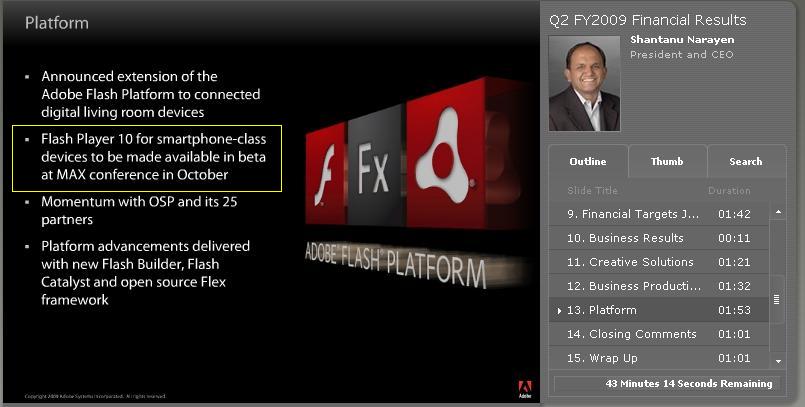
    Well, according to Adobe's 2nd quarter earnings call, they are releasing Flash for smart phones (Flash 10) this October. And it is expected to be on Androids.

    adobe-earnings


    View entire call


    If Android phones have Flash, they will have at least this edge on Blackberry and iPhone. This includes the ability to deliver m-learning created with Flash.  I just can give up on using Flash/Flash Lite for delivering m-learning.