Tuesday, July 14, 2009

Following the eLearningLearning Community

If you have not been to eLearningLearning.com recently you will notice their redesign and new features. I am a frequent visitor and also member of this elearning blog community. It's a great collection of elearning blogs with a wide spectrum of perspectives.

Here are some of the new features that make it easy to to follow:

  • Best of  link- Provides the best posts on eLearningLearning based on social signals.

  • RSS - The best of eLearningLearning or full list of blog posts.

  • e-Mail - Receive recaps of the best of elearningLearning or receive recaps of the full list of blog posts.

  • Twitter (elearningPosts) - An easy way to follow eLearningLearning's posts and when an interesting blog post appears you can zip right over using the tinyurl link.


Outside of going directly to www.elearninglearning.com, my preferred way to follow eLearningLearning is on Twitter.

If you are not following eLearningLearning, you do not know what you are missing. Go ahead, visit the site, explore and start following this wonderful elearning community.

you have to fight for the right TO BE ENGAGING

I just read a comment on a blog where a someone was very frustrated by bland, unengaging page turners. It got me thinking. How do you get a an organization out of the rut of making page turners and to start creating more engaging and effective courses? Here are my first thoughts:

  • Put on your instructional designer hat and do everything you can to educate all involved (SMEs, clients, managers, and audience too) on what effective e-learning is and how all involved can benefit from it.

  • Show all involved what effective e-learning looks like, actual examples. Here is just one place where you can find examples -http://minutebio.com/blog/free-e-learning/ (this my Free e-Learning collection ).

  • Find case studies, articles, evaluations, etc. that support your case.

  • Create a prototype to demonstrate the level of interactivity and engagement your organization can produce in a course. Get your co-workers involved so they will be vested in the "new approach." This will earn you supporters and people who can rally against the archaic page turners the organization still wants to produce.

  • When you launch your prototype/course and your audience provides positive feedback. Be quick to send that feedback to the powers to be along with any evaluation you have done. They will have a hard time arguing against more interactive courses then.

  • Continue to evaluate your courses even after you have been given the go ahead and resources to create more interactive courses. If you can demonstrate positive results for all 4 levels of evaluation, especially "results," they will have little argument for ever implementing a page turner again.


What else can be done to address the organization stuck in page turner mode? Please feel free to make suggestions. Thanks.

Monday, July 13, 2009

Building a Camel

"You put together a committee to build a horse and get a camel."

That is what I have been going through with my SMEs. I had the right subject matter experts (SMEs), all with the expertise needed, and not too many to be productive or reach a reasonable consensus. Somewhere along the line they took it upon themselves to invite more into the mix  and now reaching a concensus is becoming difficult.

The bigger problem is they all want to throw more content into the course. The SMEs want everyone to be subject matter experts too. While the learners need the skills to do to do THEIR job effectively, not to master all the skills they are not expected to ever apply.

Today the SMEs surprised me. They wanted to push the training up 3 weeks due to an earlier than expected system release. This is the first time I have ever experienced an early system release. Usually these are delayed, maybe on time, but never early. Anyhow, what is an e-learning guy to do?

It was an opportunity to make sure we built a horse!

Here is what I did:

  • Shaved 1 week from the amount of time participants have to take it prior to the system release. This means I have 2 weeks less development time and participants have 1 less week to take the course. It's a compromise between the learners/participants and me, and the SMEs still get to keep there training prior to the system launch date. I hate giving participants less time, but it is a necessary evil.

  • Revisit the storyboards and determine what can be eliminated from the course that is not essential to participants being able to use the new system. This will accomplish the following:


  • Shave a lot of development time off. Especially if it includes eliminating unnecessary simulations. I know for a fact there are numerous topics, demos and sims that are what I call "nice to knows." It is great to provide background info or more about the system's inner workings, but for the sake of time on our part and the participants part too, they can use the system effectively without this some of this info. And believe me, my audience will appreciate a succinct course, while still being able to learn exactly what they need in order to use this system.

  • Redesigning some of the interactive sims (try me sims) into demos (show me sims) instead. The very simple tasks will transfer and be retained just as well with out the practice, in my opinion. I will still invest the time needed to develop the interactive "try me" sims for the more complicated tasks.


Yes, it is a pain to have less time to develop this course, but at least it can be a more succinct, focused and hopefully a more effective course.

Saturday, July 11, 2009

Ethnographic Study on Kids and New Media

Here is Mimi Ito on Living and Learning with New Media. She has conducted an ethnographic study on what youth are doing with new media and discusses some of the results. She provides a good perspectives on how kids are using new media, including how they learn with new media/social media. This supports many of the approaches we are taking as an industry including social/informal learning. When watching the video I kept reminding myself that the subjects of her study will be entering the job market rather soon and will be participating in our corporate learning soon. Not to mention 20 somethings are probably using new media in many of the same ways. The video is provided by Edutopia.org.

http://www.edutopia.org/media/videofalse.swf

Here is Mimo Ito's blog post on the study's findings.

Wednesday, July 8, 2009

What I Ask During a Course Review

I just released the first draft of a new WBT course and as usual I have a slew of people reviewing the course. This includes Subject Matter Experts (SMEs) among others. In the past I have provided a general list of what aspects of the course should be reviewed (e. g. grammar, accuracy of content, navigation, technology, etc.). This time around I compiled a far more detailed list of concerns reviewers should be attentive to during their review. It is meant more as guide to what they should be looking for, but can also be used as a questionnaire.

Here is what I included:

Grammar


  • Check spelling, grammar, and consistency of language.


Objectives/Learning needs


  • Does the course answer your questions/concerns about the subject?

  • Do you feel prepared to begin applying the new knowledge/skills learned?

  • Does the course meet the objectives presented at the beginning of the course?

  • Do you feel you now have a better understanding of the subject at hand?


Navigation


  • Were there any links or buttons that did not work?

  • Were all navigational elements marked appropriately?

  • Were you able to navigate through the course with ease?


Graphics


  • Do you find the graphics helpful?

  • Do the graphics appear properly?

  • Was text in the graphics clear and visible?


Animation


  • Does the animation appear properly?

  • Was text in the animation clear and visible?

  • Do you find the animation helpful?


Simulations/Interactivity


  • Are the soft skill simulations reflective of realistic scenarios?

  • Do the simulations, interactive exercises and/or pop-ups function properly?

  • Are the software simulations/demonstrations realistic and appear to reflect the actual “live” system?


Assessment


  • Do the questions measure your understanding of the content presented?

  • Are there questions that address content not presented in the course?

  • Are the questions/answers accurate and pose no potential exceptions that could make an answer incorrect?

  • Is the feedback provided helpful?

  • Does the assessment provide correct scoring results?


Misc. technology


  • Does the audio function properly?

  • Do the videos function properly and appear professional?


I am sure as time goes on questions will be added and some will be eliminated. What would you include, eliminate or change on this list? Any input would be great.

Sunday, July 5, 2009

Overview of Kirkpatrick's 4 Levels of Evaluation

Here is a nice, quick overview of Donald Kirkpatrick's Four Levels of Evaluation provided by Kirkpatrick Partners, LLC.  Also a nice addition to the Free e-Learning page.
Update on 1/26/2010 - the slides are no longer available online. Sorry for the inconvenience

Slide 12 have a helpful matrix of tools that can be used for measuring each level.

Monday, June 29, 2009

Storyboard Templates and Resources

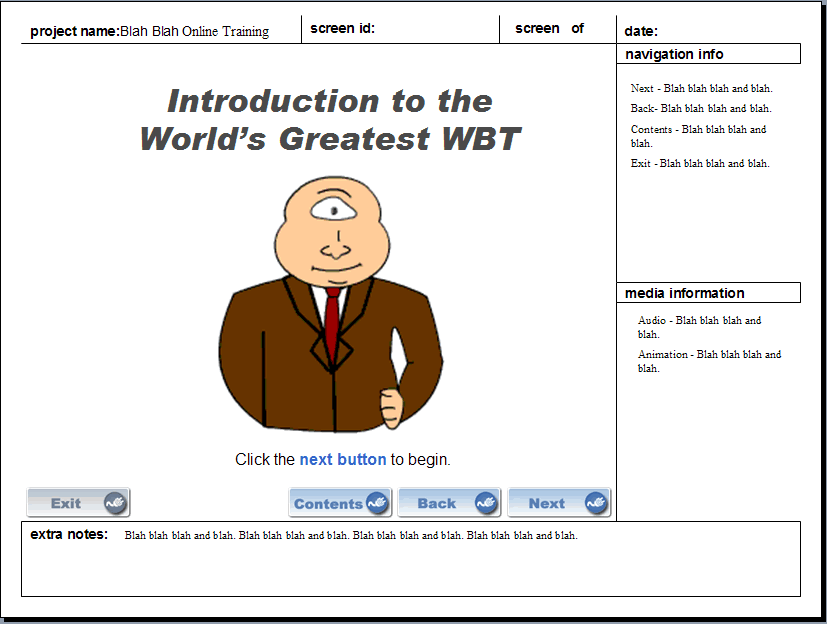
storyboardFor the last week I have been in storyboard mode for a large course I am creating. Since grad school I have been using the same format for storyboards, when I do use them. Some projects benefit from use of storyboards, some do not, but that is another post.

The storyboard I use is a very simple, but flexible format that we used in my school's ISD program. I have made a few small changes to it. Here is the template, which is made in PowerPoint, but could easily be made in MS Word too.

And here's what I include in my storyboards.

In the main frame:

  • Textual content

  • Graphics (even if rough representations)

  • Screenshot or representation of animations, interactives, etc.

  • Buttons and/or navigational features

  • Page orientation


In the side frames:

  • Navigational info (i.e. where each button or link will take the user)

  • Text for pop-ups or rollovers

  • Media info (e.g. info about the animation, video, audio, etc.)


In the bottom frame:

  • Notes to developers, SMEs, or anyone else that may have access to the storyboard

  • Notes that won't fit in the side frames

  • Any pertinent notes that don't fall under "Navigation" of "Media"

  • Color requirements, screen size, graphic sizes, etc.


Storyboard formats very widely. The above happens to be the format I like, but here are some more storyboard resources you may find helpful:

Multimedia Storyboard - Studio 1151

Storyboards for eLearning - The eLearning Coach

Free Storyboarding Template - eLearningLive.com

Creating Scripts and Storyboards for e-Learning - e-LearningGuru

Really Fast Storyboarding for e-Learning Projects - Learning & Performance Tips

Example of a storyboard in MS Word - Learning & Performance Tips