At the moment I am busy storyboarding a course. So, here is what I would like to share today...a great video about the history of storyboarding, how it is done in the film industry, and its benefits. Please pay attention because much of it translates to what we try to accomplish in e-learning.
http://video.google.com/googleplayer.swf?docid=-2412052664775629371&hl=en&fs=true
Thursday, June 25, 2009

Wednesday, June 24, 2009
Developing With Flash Lite Video Series
Dale Rankine recently launched the first video of his video training series for Flash mobile developers. If you are interested in developing with Flash Lite, say m-learning, you will want to check this out. The videos are developed for delivery on Adobe TV, but he is also making them available on Vimeo. Here the link, http://vimeo.com/adobeflashlite.
I am looking forward to seeing more of these videos and will be adding this to my Free e-Learning page, of course.
I am looking forward to seeing more of these videos and will be adding this to my Free e-Learning page, of course.
New e-Book From e-Learning Guild
 The latest e-Learning Guild e-book has just been released.
98 Tips For Selecting and Working With e-Learning Providers
FYI: All their e-books are free.
It includes 54 Tips for Selecting e-Learning Service Providers, 44 Tips for Working Successfully with e-Learning Service Providers, and an article by Evelyn Jackson, "Improve Outsourced e-Learning Quality with Consistent Standards."
Tuesday, June 23, 2009
Android and Flash?
It was announced today that Verizon and T-Mobile are offering Motorola smart phones based on Google's Android operating system. These will be available later this year. T-Mobile already offered one phone with Android, the G1, and will have the My Touch 3G during the summer.
Will these new Google Androids have Flash?
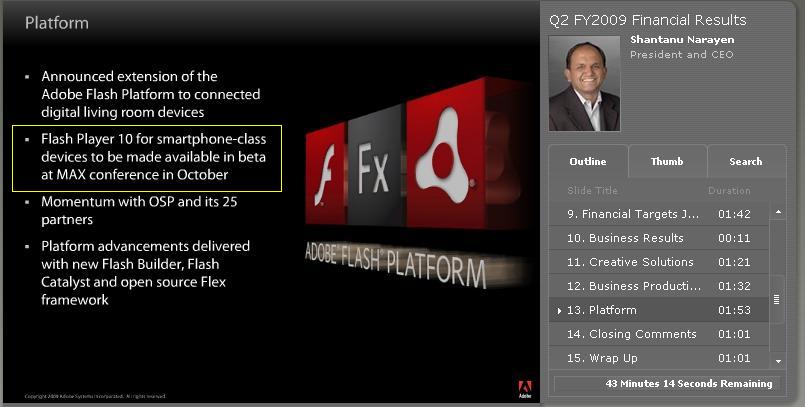
Well, according to Adobe's 2nd quarter earnings call, they are releasing Flash for smart phones (Flash 10) this October. And it is expected to be on Androids.
Will these new Google Androids have Flash?
Well, according to Adobe's 2nd quarter earnings call, they are releasing Flash for smart phones (Flash 10) this October. And it is expected to be on Androids.
If Android phones have Flash, they will have at least this edge on Blackberry and iPhone. This includes the ability to deliver m-learning created with Flash. I just can give up on using Flash/Flash Lite for delivering m-learning.
Saturday, June 20, 2009
Where Organizations Go Wrong With e-Learning
A post on e-Learning Guild's group on LinkedIn asked, "In What Ways Do Organizations Get eLearning Wrong?" This question really got me thinking. There are many organizations that get it right, but many get it wrong too. Here are my thoughts on pitfalls organizations must avoid.
Feel free to add to the list.
- Not knowing the difference between an e-learning designer and an e-learning developer. Companies that only employ staff with development skills will end up with courses that look nice, but are not instructionally sound. Note: If the budget does not afford both a designer and developer, then find someone with both sets of skills.
- Letting subject matter experts write courses. Again, an e-learning/instructional designer is needed to create engaging, instructionally sound courses.
- Not conducting a needs assessment prior to creating a course. A needs assessment, even if done informally, is the only way to identify the audience's learning needs, if any. Too many training departments act as order takers and end up creating courses that are not addressing the solutions needed.
- Not identifying if e-learning is an appropriate medium for specific training needs. Some things ARE best delivered in the classroom.
- Creating page turners, ugh! Courses can be non-linear. And they should also be interactive and engaging.
- Not evaluating courses.
- Thinking e-learning is only __________. e-Learning is a breadth of training approaches. It is not just asynchronous online courses. e-Learning is also synchronous courses, blended learning, informal or social learning, etc. And within these there are many, many types of delivery mediums and approaches. And more on the horizon.
Feel free to add to the list.
Thursday, June 18, 2009
Financial Education - What's Out There
I saw today that MasterCard launched Learning Centres, which provides financial management tips for consumers. Are they doing the same here in the USA? I found they have a learning center on the U.S. site. And they have a DIY Guide for Young Adults. However, it markets their cards as much as it provides financial advice.
Full disclosure, I am employed by a financial institution, but I am also an advocate of financial education/literacy. As we has seen far too much of, people who are not up to speed with how personal finances, credit cards, and banking products work can get into extreme jams to say the least. And they are also easily taken advantage of . So, here are some resources provided without any marketing from financial industries.
Money Smart - FDIC
Fundamentals of Personal Financial Planning - University of CA - Irvine
Link & Learn Taxes - Internal Revenue Service
And to quote Shakespeare, "Neither a borrower, nor a lender be."
Full disclosure, I am employed by a financial institution, but I am also an advocate of financial education/literacy. As we has seen far too much of, people who are not up to speed with how personal finances, credit cards, and banking products work can get into extreme jams to say the least. And they are also easily taken advantage of . So, here are some resources provided without any marketing from financial industries.
Money Smart - FDIC
Fundamentals of Personal Financial Planning - University of CA - Irvine
Link & Learn Taxes - Internal Revenue Service
And to quote Shakespeare, "Neither a borrower, nor a lender be."
Sunday, June 14, 2009
Delicious, Take Two
I signed up for Delicious social bookmarking quite a while ago, but it just didn't take for me. Perhaps the fact that I could not access it at work or that I was perfectly happy with using my browser for bookmarking. Either way, I set-up Delicious and just never really used it beyond the first few days. Why not give it another try. After all, I am trying move more onto the cloud, I can have my bookmarks in one place and I can share sites that I value. Let's hope my new job does not block Delicious. I will find out tomorrow.
Here is what I like so far:
So, I started with bookmarking and tagging the links I have collected on my Free e-Learning page and added a few blogs, blog communities and some e-learning resources.
And here is my Delicious tag cloud.
FYI: Here is a great video on social bookmarking and Delicious.
I am sure there are additional features on Delicious that I should be using. Let me know what Delicious tools and features you would recommend.
Here is what I like so far:
- Everything can be tagged - easy to stay organized
- Adding a badge widget to my blog, promote sharing my bookmarks
- Adding a Delicious tag cloud to my site or blog (see my Delicious tag cloud below)
- Viewing how many people, and who, bookmarked pages. It's motivating to see someone tag my pages
- Finding new and interesting sites by viewing other people's bookmarks
- Easy access from any computer, if Delicious is not blocked by the "man" at work.
- Customized descriptions of each bookmark can be added
So, I started with bookmarking and tagging the links I have collected on my Free e-Learning page and added a few blogs, blog communities and some e-learning resources.
And here is my Delicious tag cloud.
FYI: Here is a great video on social bookmarking and Delicious.
I am sure there are additional features on Delicious that I should be using. Let me know what Delicious tools and features you would recommend.
Subscribe to:
Posts (Atom)