Tuesday, March 4, 2014

There is No "PowerPoint"

So often I get a call from subject matter experts (SME) and other stakeholders regarding elearning courses asking, "Can't you just send me the PowerPoint?" My answer of "There is no PowerPoint" is usually not received well and followed by a tone of disbelief. I don't deny them a PowerPoint because they will probably compromise the instructional integrity of the courses, which is possible, or because I am selfish. It is usually because the course simply wasn't made in PowerPoint or only portions of the development process was made using PowerPoint and what they would get would be fragments of a course at best. However, when people outside of eLearning see the final product they associate it with the closest thing they are familar with in their world, which is PowerPoint. 

So, here is the deal:

Most courses are developed with tools that are not PowerPoint. For example, Captivate, Flash, ToolBook, Storyline, etc. All of which I have used and been asked to "send the PowerPoint."

Some development tools use PowerPoint as an initial interface, but it is in combination with eLearning development applications. An example I have is Articulate Studio. This can be difficulty to explain to the SME that is eager to get hold of your elusive "slides." This is especially true when they have seen you working in PowerPoint when story boarding or other early stages of development. 

So, the moral of the story is let your SMEs know up front about the development tools you will use and what deliverables can and will be provided. 

Feel free to add your comments and opinions. I'd love to hear if you have had similar experiences and how you've addressed it. Thanks. 

Thursday, February 20, 2014

Giving Pinterest Another Try

I started a Pinterest account quite a while ago, but my interest in it waned quickly. It really did not fill any need for me. In the last few weeks I decided to give in another try. 

So what have I been pinning? Here are the categories I have so far:
  • eLearning - I pin interesting eLearning infographics, pages, resources, etc. 
  • eLearning Screenshots - Various screens from courses I have made. Since most of what I have developed sits within a learning management system (LMS), inaccessible to non-coworkers, I thought it nice to share at some screens from a few of my favorite courses. Only a couple of courses are represented now, but more to come. 
  • Maryland History - I love local history and especially historical pics. 
  • Rhode Island - That's where I'm originally from and it's always nice to pin some pics that remind me of home. 
As you can see, I have been getting some use out of it and starting to appreciate its value. 

Happy pinning!


Monday, January 20, 2014

Do You Know What We Do? #eLearning Infographic

I was having a discussion with some fellow eLearning designers and we got deep into the complexities of working with subject matter experts (SME). Many great ideas came out of the discussion (e.g., guidelines, agreements, best methods of identifying SMEs and a lead SME, etc.). One thing I brought up was that so few SMEs realize what is involved in the process of creating elearning courses or any instruction for that matter. I mentioned that I have been wanting to create an infographic demonstrating the process of developing elearning, from inception to loading it to the LMS. It would be helpful to SMEs and the elearning designer trying to bring them into the fold... and down to reality. 

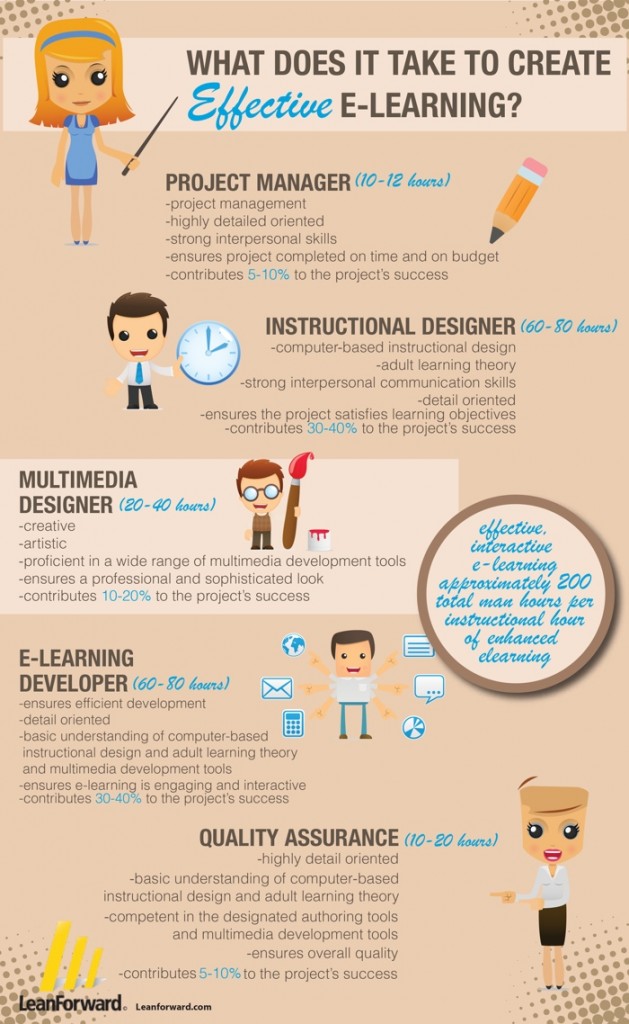
Well, one of my fellow elearning designers said, "Have you looked? There's probably already one out there." So, I looked and found the following infographic.


It is a good overview of the process of creating effective eLearning... and I'm glad they (Leanforward) added the word "effective." After all, much less is involved in developing "ineffective" learning. The times listed do have to be taken with a grain of salt. Although I think they are not too far off in many scenarios, there are many variables that affect the time involved (e.g., complexity of content, multimedia used, level of interactivity, developers skill level with development tools, etc.). The competencies and time needed for implementation, (e.g., loading to the LMS or web, testing, enrolling staff, etc.) is not addressed. Something to also consider mentioning when sharing this with your SMEs.

I think it will be a good thing to also share with anyone interested in entering the elearning field - So, they know what they are getting themselves into and the competencies they will need.

In addition to this infographic, Graphs.net has quite a few more eLearning infographics of interest.

Sunday, December 8, 2013

Getting Started in eLearning

I think like most people in our field, I am often asked how to get started in eLearning. Well, the eLearning Industry site has released "How to Become an eLearning Professional," an ebook of tips for people interested in getting started. It has practical advice from 23 leaders in the field. It will definitely be a resource I share with people interested in entering our field.

While we're on the subject, I will add that anyone getting started in elearning need to be prepared to invest the time to acquire the competencies needed. There are many misconceptions about our field that mislead people in believing they can start by simply acquiring the "right" development tools and jumping right into making courses. As anyone working in the field will probably agree, it is not as simple as mastering the development tools. It also involves becoming competent in elearning design. Without a focus on design, and I have seen this many times, one will just spin their wheels (e.g., develop courses that do not provide effective instruction, do not address the audience's learning needs, etc.).

If you are interested in elearning, do not look first to the development tools, but rather how to DESIGN learning. Here is a list of ISD graduate programs, which I believe are worth the investment. I know not everyone is interested in the graduate school route and in that case you may look to certificate programs or workshops whether at an academic institution or through groups like ASTD or the eLearning Guild.

Reading elearning blogs is also a good way to learning more about elearning and finding additional useful resources for getting started. Plus, blogs often provide opportunities to pick the brains of many knowledgeable practitioners. eLearningLearning is a good place to find such blogs. Following elearning designers on Twitter is another good way to expand your personal learning network (PLN). 

Good luck and don't forget to check out the "How to Become an eLearning Professionalebook.

Monday, November 18, 2013

Some #DevLearn Thoughts and Resources

I've been catching up at work since my trip to the DevLearn Conference. Although I do not have the time needed to write a very lengthy post about my wonderful DevLearn experience, I at least want to post a bit about some of the things that impressed me and also provide some post-conference resources.

By the way, the only complaint I have about the conference is that there were just too many great presenters. I continually found myself deciding between multiple interesting sessions occurring at the same time. Some of the sessions I enjoyed are listed below. Many of the other presentation slide decks are available on the DevLearn Handouts page

  • I recommend visiting David Kelly's curated backchannel, who has many great resources from the backchannel and also did an amazing job putting this conference together. 
There were so many great sessions, networking and all around e-learning fun, I highly recommend the conference to anyone that can make it next year. 

*Although some of the videos require paid membership, the benefits of membership are well worth the price. If on a tight budget, there is no cost for the Associate level although access to Guild resources are limited at this level. Check out membership options here

Friday, October 18, 2013

Off to #DevLearn

I am über excited to be heading to the Devlearn Conference next week and just as excited to be presenting too. I'm willing to bet most of this blog's readers have already heard of this conference. If not, it is the best elearning conference you can attend in my opinion. It is chock full of great sessions, a phenomenal DemoFest,  truly inspiring attendees and even a live #LrnChat. However, it can get overwhelming, but do not fret because there are plenty of helpful resources for anyone attending and here are a few. 

  • The Devlearn Docent program - A great for first timers who would like some expert guidance during the conference. 
  • IDGlobalEvents Blog DevLearn post - Wonderful tips for anyone attending.
  • The DevLearn App - An app with many features including session descriptions, a personal schedule, social networking with other attendees and speakers and much more.
  • The #Devlearn backchannel - Great way to participate, interact and share your experience. FYI: If you can't attend in person this is the next best thing.
If you are there please look for me and say, "Hello." Hope you can attend my session too (304 -Adding "More" Character to Your eLearning). 


See you in Las Vegas!