Thursday, May 21, 2009

Here's the Course

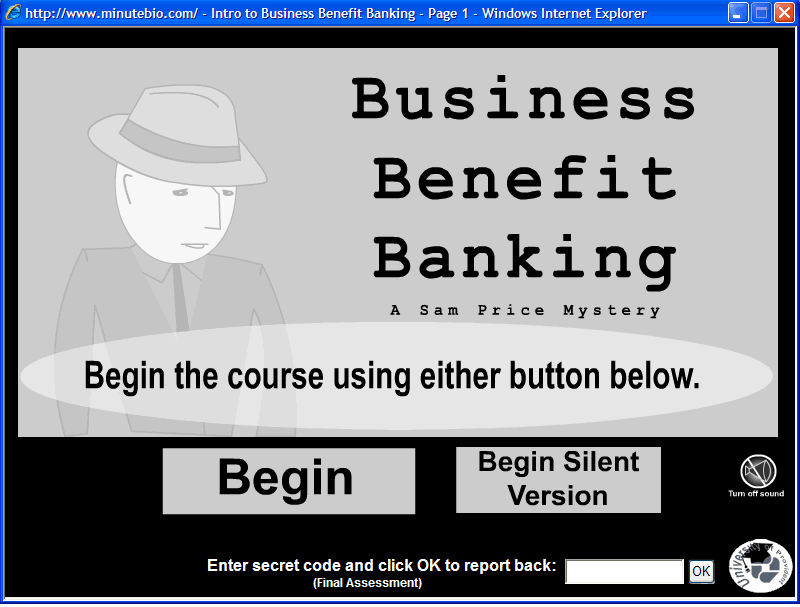
Business Benefit Banking WBT Today, I was able to participate in Corporate Learning Trend's e-Learning Tour. Thank you Tony Karrer for including my presentation.

Demonstrating the course via screenshots did not give full justice to the the course. So, here is a link where you may view it at your leisure. The course is a non-linear self paced course created for my corporate university and introduced a new relationship banking service.

Business Benefit Banking WBT

The e-Learning Tour had some really amazing examples of m-learning, games, and self-paced courses. A big kudos goes out to Tony Karrer for putting this together. Hopefully, their will be many more like it to come.

Sunday, May 17, 2009

Wacom

Wacom Graphic TabletI am considering buying a Wacom. If you do not know what is, it is a graphics tablet. You can connect it to your PC and with it's pen you can write, draw, illustrate, etc. This can give more of a pen to paper approach to creating graphics, which for me is a big advantage over creating graphics only with a mouse. And it is compatible with a fair amount of software including many Adobe products such as Flash, Fireworks, and Photoshop. I am a big user of Flash and can see many advantages to having a Wacom at my side when developing in Flash. And not just animations, but also enhancing sims and videos developed or imported into Flash. Especially  videos, which I love to "Add Pizzazz to videos."

I do not have formal training in graphics, but without a graphic artist at my disposal I have been forced to learn enough to hold my own. This is probably the case for many e-learning designers. As a side note, having a skilled graphic artist on an e-learning team is essential, but not always a reality. So, any tools I can get my hands on to improve the quality of graphics I use and speed up the process, the better.

Here are some tutorials I have found while exploring Wacoms:

40+ Tutorials for Working WIth Wacom Tablets

How to Create an Animated Walk Cycle in Flash (Using Flash and a Wacom)

How to Work With a Wacom Tablet in Photoshop

Adobe Photoshop Tips and Tricks (Wacom)

Friday, May 15, 2009

US Army Using Interactive Videos

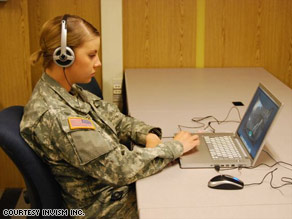
Here is an article on one way the army is using videos in online learning. http://www.cnn.com/2009/TECH/05/15/soldiers.videogames/index.html

They are creating "immersive cultural simulation" programs, which uses realistic video created in California, but also combines it with actual footage from Iraq. They make an important point in the article that "...soldiers relate more to human characters than virtual avatars." I would think this is extremely important when it comes to cultural sensitivity, which they are using the simulations for. Bottom line, they are presented with a realistic video depicting a scenario where they must make a choice and then shown the results of their choice. Not a terribly complex design, but probably effective.

Wednesday, May 13, 2009

Audience Take-aways From LinkedIn Training

A quick, very informal evaluation of my Online Professional Networking class. Several weeks back I held my last online professional networking class, which focused on using LinkedIn. And due to the bank acquisition and upcoming lay-offs, it had a very strong focus on using LinkedIn as a tool for employment networking.

With less than two weeks left in this bank's existence, there is no viable need for a course evaluation. However, for the sake of knowing what skills are being applied (level 3 - Behavior) I can peruse the profiles of my attendees, many of whom are connections, and see what learned skills they applied. The class did teach many skills I will not be able to view via their profiles such as writing an effective introduction, searching for business or employment opportunities, actively participating in groups, using LinkedIn as a CRM tool etc. I can see if they are joining groups, completing their profile, using applications, recommendations, status statements, etc. This will be far from a true level 3 evaluation, but it may be helpful to anyone providing a similar training.

The random sampling of 10 attendees are all in the U.S. banking industry and vary in education from high school diploma to advance college degrees. It is also important to note that the vast majority are returning to the job market and attended the class due to this fact.

The number of the 10 sample participants using these features are in parentheses.

  • Joined groups (8)

  • Completed all sections of their profile (6)

  • Utilize LinkedIn status statement (4)

  • Customized their profile URL (4)

  • Received recommendations (4)

  • Used applications (1)


I strongly advocated joining groups in the training. And of the 8 who joined groups, 7 joined multiple groups. So, it is great to see they took my advice. It is also nice to see that people are taking the time to complete their entire profile. 

If time permitted I would have liked to compare these numbers to a control group. And evaluate all aspects of the course, not just what can be measured from looking at an audience's profiles. Perhaps I will be facilitating some version of this class in the future and then evaluate the class in a more formal manner.

Well, this is my very informal evaluation. Hopeful it provides some insight for any LinkedIn trainers out there.

FYI: In addition to the classroom training, I did create some Captivate sims of my LinkedIn tips. Feel free to give them a try and please feel free to share the link with any LinkedIn users, they are absolutely free. http://www.minutebio.com/LI/PowerTips.htm
Monday, May 11, 2009

e-Learning Tour - May 21

Learning Trends will be hosting a free tour of e-learning examples that are being implemented out there. The event is on May 21st and you can learn more and sign-up at http://learntrends.ning.com/events/an-elearning-tour-may-learn.

I am also happy to be participating in Tony Karrer's portion of the tour. During his portion there will be demonstrations of different types of asynchronous, self-paced eLearning. I will discussing a non-linear WBT* created for my corporate university at Provident Bank. 

Presenters include:
Bob Mosher - Performance Support Tools
Judy Brown - Mobile Learning Solutions
Karl Kapp - Games and Simulation
Tony Karrer - Self-Paced and Other eLearning Solutions

The Self-Paced portion will include:
Really Rapid eLearning - A rapid process, integrating SMEs to produce software overviews.
Ben Duffy, eLearning Program Manager, Fairchild Semiconductor

Narrative eLearning - Teaches about Pandemic Influenza Preparedness at Work and at Home through conversations at work and at home, and newscasts - incorporating audio and bandwidth constrained “video.”
Kim Koehler, Learning Center, Park Nicollet Health Services

Scenario eLearning - Introduces AmeriCorps VISTA to new members through an exploratory environment with interactive scenarios.
Angela Nicholas, Instructional Designer, Northwest Regional Educational Laboratory

*Non-linear, Clue/Puzzle eLearning - Introduces banking staff to a banking service and customer enrollment through a film noir setting where learners play a private detective search for clues.
Jeffery Goldman, e-Learning Designer, Provident Bank

Social eLearning - A reusable product that invites conference audiences into a conversation with keynote presenters before and after the event.
Douglas Flather, Vice President, Product Development, Washington Speakers Bureau Multimedia

Hope to see you there! View the event overview


Sunday, May 10, 2009

Additions to the Free e-Learning Page

Here are a few new finds for the Free e-Learning page.

Enjoy:

International Space Station - NASA

NASA 50 Years - NASA

What is Printing - Museum of Modern Art (MoMa)

Van Gogh and the Colors of the Night - Museum of Modern Art (MoMa)

FAUXTOGRAM - Red Studio (MoMa) If you are a fan of Man Ray you will enjoy this .

If you have of any open access e-learning courses please let me know and I will add them to the Free e-Learning page. Thanks.

Thursday, May 7, 2009

Course Design Plans

Whenever I design a course, e-learning or classroom, I will write a course design plan (CDP). How CDPs are written may vary in the instructional design field. What we call them varies too. Either way, they lay out a great foundation for the creation of sound instruction.

Here is what I include in my course design plans:

  • Rationale

  • Course description

  • Target audience

  • Participqant prerequisites

  • Learning objectives (terminal and enabling)

  • Evaluation plan (I subscribe to Kirkpatrick's 4 levels)

  • Course map

I have been following this format since grad school and it has not failed me yet. After writing a CDP, I then proceed to creating storyboards or go directly to development phase, depending on the complexity of the course and if there are other developers involved in the project.

Here are a few helpful  resources:

ISD From the Ground Up - This book is great resource for CDPs, lesson plans and applying Gagne's 9 events of learning. It has been on my bookshelf from my early days in e-learning.

Training Management Plans From Don Clark's Big Dog, Little dog site, which is chock full of ISD resources.

Do you use a course design plan or something similar?